KeyMapper
A downloadable tool for Windows
What it KeyMapper?
Simply put , It's free software for remapping keys on Windows !
it works like this : Press D on your keyboard and the game/app will recieve G instead, All Inputs* apart from Left and Right Click can be mapped into other keys,
Easy to use and offers a bunch of nice features !
What it’s for?
-
Keep different key layouts per game/app.
-
Fix missing/awkward laptop keys.
-
Create ergonomic layouts for editors, CAD, stream decks.
-
Auto-swap mappings when you switch windows / apps
- RDFG or ESDF users ( created for that reason first ! )
What it does
-
Map any key or mouse button to another key or mouse button.
-
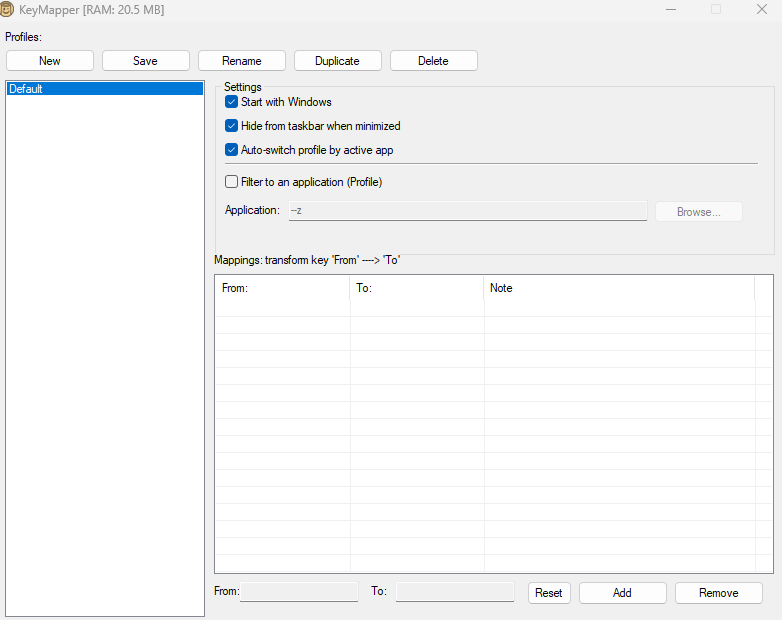
Link your mappings to Profiles you can save for different apps
-
Per-app filter: make a profile apply only to a chosen
.exe. -
Auto-switch profiles based on the active process.
-
Add Notes to your mappings (handy for complex sets / games).
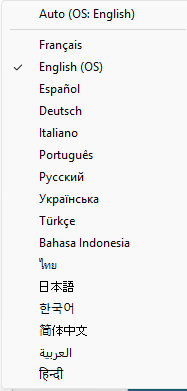
Configurable Params :, start-with-Windows, hide-on-minimize,language menu via the tray icon (16 langs),
-
Stores settings in
%AppData%\KeyMapper\KeyMapper.ini. Portable and lightweight, doesn't need admin rights if you have a work machine / family machine - Key mapping are disabled on Keymapper itself so you don't have to keep track on what key you switch or want to mep , it's all default keyboard keys
Quick start
-
New profile → (optional) tick Filter to app and pick the target
.exe. Click From, press a key → click To, press a key → Add.
Repeat for other keys you want to change
-
Enable Auto-switch if you want profiles to change with the active window.
- Start your game/app and enjoy !
You can double click on mappings and notes to modify them !
Available in Languages :
English,French ,Spanish,German,Italian,Portuguese and 10 other languages
*Gamepad is not supported yet but i'd gladly add it as an update if someone has a need for that.
Thank you for reading so far!
Donate button is down here if you liked the app ! it's optional and will be forever
please tell me if you've had any bugs or want any improvements / niche scenarios , i might be able to implement them , and in general if you have other needs for software please contact me I'd be interested to hear you out.
Download
Install instructions
Quick start
-
New profile → (optional) tick Filter to app and pick the target
.exe. - Click From, press a key → click To, press a key → Add.
- Repeat for other keys you want to change
-
Enable Auto-switch if you want profiles to change with the active window.
- Start your game/app and enjoy !
You can double click on mappings and notes to modify them !
Development log
- KeyMapper - update 1.2Aug 26, 2025
- KeyMapper - update 1.1Aug 26, 2025
Comments
Log in with itch.io to leave a comment.
Love this </3
I love the simplicity and functionality of your keymapper, it just works™! Would you consider adding a "start minimized" option?
Can you add a feature that lets you select letters from a dropdown menu? my w key is broken and i cant remap the key to another for games that don't allow changing keybinds
I certainly will ! that's a good idea I haven't thought of that , I'll work on that today and get back to you with a new version :D
It should be up if you want to try it :D
https://sundaylab.itch.io/keymapper/devlog/1017536/keymapper-update-11